Indiramma Illu Status 2026 | List 2 Telangana & Sanction List
Your status says “List 2” — and nobody told you what that means. It is not a second beneficiary list. It is not a waiting list. It is your category.
మీ స్టేటస్లో “List2” అని కనిపిస్తోందా? అది రెండో జాబితా కాదు — అది మీ కేటగిరీ.
| Your screen says | What it means | What you get |
|---|---|---|
| List 1 (L1) | You own land. You have no pucca house. | ₹5 lakh to build on your own land |
| List 2 (L2) | You own no land and no house. | A house plot, plus construction assistance |
| List 3 (L3) | Records show you already own a pucca house. | Marked ineligible. If that record is wrong, it can be corrected. |
List 1 — మీకు స్థలం ఉంది, ఇల్లు లేదు. ₹5 లక్షల సహాయం. List 2 — మీకు స్థలం లేదు, ఇల్లు లేదు. ఇంటి స్థలం + నిర్మాణ సహాయం. List 3 — రికార్డుల ప్రకారం మీకు ఇల్లు ఉంది. అనర్హులుగా గుర్తించారు.
To check your status:
Open indirammaindlu.telangana.gov.in → tap the Application Search tab on the homepage → enter any one of these four:
- Mobile Number — the one you gave when you applied
- Aadhaar Number
- Application ID — from your acknowledgement slip
- FSC Card Number — the number on your Food Security Card (ration card)
Press Search.
There is no Indiramma Illu app for the public: The app you may have heard about belongs to government officers. They use it to photograph your construction and record its location. You do not need it, and you should not go looking for it. Any app in the Play Store calling itself an official Indiramma app is not from the government. Use the website in your phone’s browser.
Search by any one of these. You only need one.
We never ask for your Aadhaar number. Every button here opens the Government of Telangana portal, where you enter your details on their page — not ours. If your mobile number no longer works, use your Aadhaar or FSC card number instead.
Name missing, status wrong, or asked for money? File it here.
Save your ticket number. Write it down or photograph it. It is the only proof you raised the matter, and the only way to follow it up.
Never type a government password into any website except the official portal. No other site, including this one, will ever ask you for it.
Stuck? Start here.
Helpline 1800 599 5991 · This is not a government website. Every official action happens on indirammaindlu.telangana.gov.in
Which Website Is Real?
The spelling is why you cannot find it
The official site is: indirammaindlu.telangana.gov.in. Read the middle of that address slowly. It is indlu — not illu. Most people search for “indiramma illu”, because that is how it is said out loud. The government registered it as “indiramma indlu”. That one letter is the reason so many people end up on the wrong website, and it is the reason a dozen lookalike sites exist to catch them.
The test that always works
The address must end in .telangana.gov.in. That ending cannot be bought. It belongs to the Government of Telangana and nobody else can register it.
indirammaindlu.telangana.gov.in— this is the government- Anything ending in
.com,.in,.co.in,.org— this is not the government, no matter what the page says or how official the logo looks
Before you type your Aadhaar number anywhere, look at the address bar. If it does not end in .telangana.gov.in, close it.
Nobody can charge you. Not for any of it.
Applying is free. Checking your status is free. Getting your name onto the list is free. If someone — an agent, a middleman, a local fixer, anyone — asks you for money to get your name added, to speed up your file, or to release your payment, that is a crime, and paying them will not help you. Report it. File a grievance at indirammaindlu.telangana.gov.in/grievenceLogin, or call 1800 599 5991. ఎవరైనా డబ్బు అడిగితే అది నేరం. దరఖాస్తు ఉచితం. స్టేటస్ చూడటం ఉచితం.
Indiramma Illu List 1, List 2, List 3: What Each One Means
You are here because a word appeared on your screen
You checked your Indiramma Illu status. The portal showed you “List2”. It did not tell you what that means, what happens next, or whether it is good news. So you typed it into Google.
You are not the only one. This is one of the most searched questions about the scheme in Telangana — and almost every website answers a different question, because they assume you are looking for a second beneficiary list. You are not. You are looking at your category. Here is what it actually says about you.
The three categories
| Your screen says | What the government’s record says about you | What you receive |
|---|---|---|
| List 1 / L1 | You own land. You have no pucca house on it. | ₹5 lakh to build a house on the land you already own |
| List 2 / L2 | You own no land, and you have no house. | A house plot, along with construction assistance |
| List 3 / L3 | Their records show you already own a pucca house. | Nothing. You are marked ineligible. |
If your status says List 2, you were not rejected. You were sequenced.
This is the part nobody explains, and it is the part that matters most to you.
Phase 1 of the scheme gave priority to List 1 — families who already owned a plot. The reason was practical, not personal: those families had land, so construction could start the day the money arrived. No survey for a site. No allotment. Just build. A List 2 family needs two things from the government, not one — the plot first, then the money to build on it. That takes longer to arrange. So if you were in List 2 and Phase 1 passed you by, that was not a judgment on your eligibility. It was a queue.
Phase 2 provides both the land and the construction support. That is precisely the List 2 situation. Your category is the one being worked through now. Keep checking. Keep your registered mobile number switched on — the field team calls before they visit.
If your status says List 3 and you do not own a house
Then something in your record is wrong, and it is worth fixing. List 3 is not a “wait” category. It is a not eligible category. The system believes you already have a pucca house. Two things commonly put a person there by mistake:
- A house that is not yours. A family home in a father’s or brother’s name, recorded against you during the survey. A kutcha house entered as pucca.
- A four-wheeler. Applicants across Telangana report finding themselves in List 3 with a vehicle recorded against their name — sometimes a vehicle they do not own, sometimes one sold years ago. Whether or not this is written into the official rules, people are seeing it on their screens, and it is putting them out of the scheme.
This is a data error, not a verdict. Your eligibility has not been examined and rejected. A wrong entry was made during the survey, and the system did the rest automatically.
It can be corrected — but only by the government, and only if you go and ask. No website can do it for you, including this one. The steps are below in “My Status Is Wrong.” Do not leave it. A wrong entry sitting in the record does not fix itself, and every list that gets published while it sits there is a list you are not on.
What about List 4 and List 5?
L4 and L5 refer to applicants added in later verification rounds, after L1 to L3 were drawn up. That much is consistent across what is publicly reported. Beyond that: we have not been able to confirm official definitions for these categories from a government source. Several websites state them confidently. Those websites contradict each other, and none of them cite anything. So we will not add another guess to the pile. If your status shows L4 or L5, go to your MRO office with your Aadhaar and your Application ID and ask them directly what it means for your file. Do not act on what any website tells you about L4 and L5 — including ours.
How to Check Your Indiramma Illu Status
ఇందిరమ్మ ఇళ్లు స్టేటస్ ఎలా చూడాలి
There is one way to check your Indiramma Illu application status, and it takes about a minute on a phone.
The five steps
- Step 1 — Open the portal. Go to indirammaindlu.telangana.gov.in in any browser. Chrome on your phone is fine. You do not need a computer.
- Step 2 — Find the Application Search tab. On the homepage you will see three tabs side by side:
Application Search · Grievance · Officer Login
Tap Application Search.
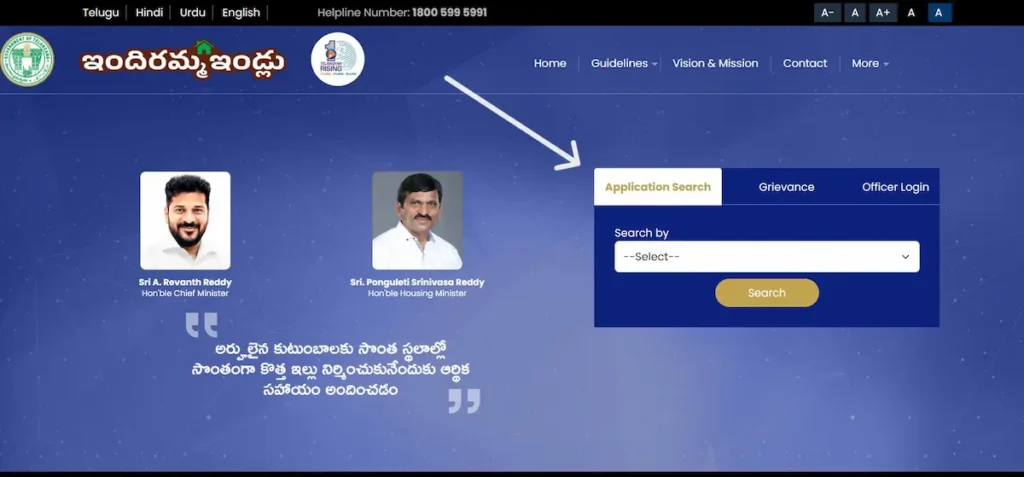
That is where the search lives. It is on the homepage itself. You do not need to hunt through the menu for it — the More menu at the top contains RTI and nothing else. Ignore it.
- Step 3 — Choose how you want to search.
The portal gives you four fields. You only need to fill one. Use whichever number you actually have:
| Field | What to enter |
|---|---|
| Mobile No | The number you gave when you applied — not a newer one |
| Aadhaar No | Your 12-digit Aadhaar number |
| Application ID | The number on the acknowledgement slip you were given when you submitted the form. It is sometimes called the Praja Palana application number. |
| FSC Card No | The number printed on your Food Security Card — your ration card |
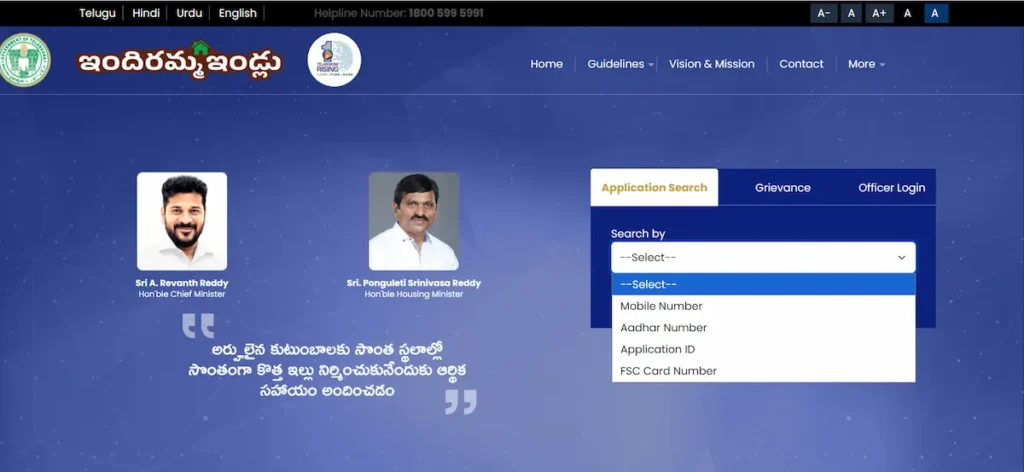
If one number does not bring up a result, try another. This matters more than it sounds — a mobile number you have since changed will return nothing, while your Aadhaar or ration card number will find the same file straight away.
- Step 4 — Press Search.
- Step 5 — Read your result.
Your details come up on screen, including:
- Your List Type — shown as List1, List2, or List3. This is your category. If you are not sure what yours means, it is explained above.
- Your application status — what stage your file has reached
- Your name and the details recorded against you during the survey
Read those details carefully. If the name, the mandal, or anything else looks wrong, that is worth acting on — a wrong entry is what puts most people into the wrong category.
Use the browser. There is no app to download.
The portal opens in a mobile browser. That is how it is meant to be used. There is no Indiramma Illu app for the public. The app people mention is the one government officers carry — they use it to photograph houses under construction and record the location, so the next instalment can be released. It is a tool for their side of the process, not yours.
If you find something in the Play Store calling itself an official Indiramma app, do not install it. Open indirammaindlu.telangana.gov.in in Chrome instead, and add it to your home screen if you want it handy.
What your status means — and what to do about it
Reading the status is one thing. Knowing whether to act, or wait, is what actually matters.
| Status on screen | What it means | What you should do |
|---|---|---|
| Pending / Under Verification | The field team has not reached your mandal yet. Verification moves mandal by mandal. | Wait. Keep your registered mobile switched on and with you — they call before they visit. |
| MPDO Approval Pending | Your file is sitting with the Mandal Parishad Development Officer. | Go to the MPDO office yourself. Carry your Aadhaar and your Application ID. This status does not usually clear on its own. |
| Approved | Your application has been accepted. | Wait for sanction. |
| Sanctioned | Your house is approved. Funds will follow. | Begin construction. The money is released in stages — officers verify each stage on site before the next payment is made. |
| Rejected | The reason is shown on screen. | Read the reason first. Then see the next section. |
One line worth remembering: Pending and MPDO Approval Pending look similar and mean opposite things. One asks you to wait. The other asks you to walk into an office. A file stuck at MPDO approval can sit there for months while a family waits at home for a call that is not coming.
My Name Is Not in the List — What Do I Do?
నా పేరు లిస్టులో లేదు — ఇప్పుడు ఏం చేయాలి?
Work through these in order. Do not skip to the last one.
1. Check the number you typed
- One wrong digit in an Aadhaar number returns nothing at all. So does an old mobile number.
- Search again, slowly. Then search a second time using a different field — if Aadhaar brings up nothing, use your FSC card number from your ration card, or your Application ID from the acknowledgement slip.
- A surprising number of people who believe they are not in the list are simply searching with the wrong number.
2. “Not in list” does not mean “rejected”
- These are two different things, and only one of them is bad news.
- Verification is carried out mandal by mandal. If the field team has not reached your mandal yet, your file has not been processed — it has not been refused. Nothing has been decided about you at all.
- If the portal shows Rejected, it will tell you why. If it shows nothing, or shows your file still pending, no decision has been made.
3. Go to your MRO office
The Mandal Revenue Officer can open your file and tell you where it stands.
Carry with you:
- Your original Aadhaar card
- Your acknowledgement slip — or the Application ID written on it
- Your ration card (Food Security Card)
Go in person. Ask them to look up your application and tell you what is recorded against it. If something in the record is wrong, this is where you find that out.
4. File a grievance online
- Go to indirammaindlu.telangana.gov.in/grievenceLogin and submit your complaint with your Application ID and Aadhaar number.
- Save the ticket number. Write it down. It is the only proof that you raised the matter, and the only way to follow it up.
- Track it afterwards at indirammaindlu.telangana.gov.in/grievenceSearch.
- Do this as well as visiting the MRO, not instead of it. The visit gets you an answer. The grievance gets you a written record with a date on it.
5. Escalate to the District Collectorate
If the MRO does not resolve it and the grievance goes nowhere, take it to the District Collectorate in writing. Carry your grievance ticket number, your Application ID, and copies of everything you have already submitted.
Helpline
1800 599 5991. The number is free to call. Have your Application ID or Aadhaar number ready before you dial.
My Status Says List 3 But I Do Not Own a House or a Car
What List 3 actually records
List 3 means the survey recorded that you already own a pucca house. Applicants across Telangana also report finding a four-wheeler entered against their name — a vehicle some of them have never owned, and some sold years ago. Either entry puts you out of the scheme.
This is a record error, not a rejection
Read that carefully, because the difference decides what you do next. Your eligibility has not been examined and refused. Nobody sat down, weighed your case, and turned you down. A wrong entry was made during the door-to-door survey, and the system sorted you automatically on the strength of it. That is a data problem. Data problems get corrected — but only if somebody asks.
How to get it corrected
Go to your Village Secretariat or Ward Secretariat, or your MRO office.
Carry:
- Your original Aadhaar card
- Your Application ID / acknowledgement slip
- Your ration card
- Anything that supports your case — a rent agreement if you rent, or documents showing the house is in a relative’s name
Ask them, in these words: “Please open my survey record and show me which entry has placed me in List 3.” You need to know which entry did it — a house, or a vehicle. You cannot correct something until you know what it is. Once you know, request the correction there.
If your name is spelled differently on your Aadhaar and your ration card, that mismatch can also cause problems in the record. Get it corrected at a Meeseva centre or a CSC centre before anything else.
File a grievance online at the same time, at indirammaindlu.telangana.gov.in/grievenceLogin. Save the ticket number. This gives you a dated written record that you raised the error — which matters if the correction takes several visits.
Can You Apply for Indiramma Illu Online? The Honest Answer
No. There is no online application. We know this is not the answer most websites give you. It is the correct one.
What is actually on the official portal
We opened indirammaindlu.telangana.gov.in and went through it. The homepage has three tabs:
Application Search · Grievance · Officer Login
That is all. There is no application form. There is no “Apply Online” button. The Officer Login is for government staff — it needs a departmental user ID, a password, and an Aadhaar OTP. It is not a way in for the public, and you should not attempt it. If a website has given you step-by-step instructions to “register and fill the online form” on the official portal, those steps describe something that is not there.
Where applications are actually submitted
In person. At one of these:
- Your Gram Panchayat office
- Your Municipal Ward office
- A Praja Palana Seva Kendra
You collect the form there, fill it in, attach your documents, and hand it back across the counter.
What to carry
- Aadhaar card — linked to a mobile number that works
- Food Security Card (ration card)
- Bank passbook — the account must be linked to your Aadhaar, because the money is paid directly into it
- Income certificate
- Caste certificate — if you are applying under SC, ST, BC or minority category
- A certificate from your local revenue office confirming you do not own a pucca house
- Passport-size photograph
Aadhaar is not optional
Aadhaar authentication is legally required for this scheme, under G.O. Ms. No. 32, dated 5 October 2024, issued under Section 7 of the Aadhaar (Targeted Delivery of Financial and Other Subsidies, Benefits and Services) Act, 2016. Your Aadhaar must be linked to a mobile number you actually have with you. The OTP goes to that number, and the money goes to the bank account linked to that Aadhaar. If either link is broken, your file stops moving. You can read the order yourself on the portal, under Guidelines → Govt Orders.
Take the acknowledgement slip. Do not leave without it.
When you hand in your form, you are given an acknowledgement slip with an Application ID on it. That number is the only thing that lets you track your file. It is what you type into Application Search. It is what the MRO asks for. It is what goes on your grievance. Take it. Photograph it. Keep the photo on your phone. Every application costs nothing. Nobody is permitted to charge you for the form, for submitting it, or for putting your name on any list.
Who Actually Decides — The Indiramma Committee
Most people picture the decision being made in Hyderabad. It is not. It is made in your village, by people who live there.
The committee in your Gram Panchayat
Under G.O. Ms. No. 33, dated 11 October 2024, the government formed Indiramma Committees at Gram Panchayat and Municipal Ward level to run the scheme locally. That is a local body, in your own panchayat or ward, involved in how the programme is carried out where you live. The order is published on the official portal under Guidelines → Govt Orders, and you can read it there yourself.
Your name is read out at the Grama Sabha
Beneficiary lists are put before the Grama Sabha — the village assembly. The list is read out. It goes up on the Gram Panchayat notice board. This happens in the open, in front of the village, before it ever appears on a website.
What this means for you, practically
Attend your Grama Sabha. If you have been refreshing the portal for months and finding nothing, this is the more useful thing to do. The Grama Sabha is where the list becomes visible first — in your own village, on a notice board, in front of the people who compiled it. It is also the place to speak. If a name that should be on the list is missing, or a name that should not be there is on it, the Grama Sabha is where that is said out loud, in front of witnesses. That carries a weight that a form submitted online does not.
Ask at your Gram Panchayat office when the next one is.
Indiramma Illu Scheme — The Verified Facts
| Official name | Indiramma Indlu (ఇందిరమ్మ ఇళ్లు) |
| Founding order | G.O. Ms. No. 7, dated 9 March 2024 — TR&B (RH&C.A1) Department |
| Run by | Commissioner, Weaker Section Housing Program, Government of Telangana |
| Chief Minister | Sri A. Revanth Reddy |
| Housing Minister | Sri Ponguleti Srinivasa Reddy |
| Assistance | ₹5 lakh, released in four stages tied to construction progress, paid by DBT into an Aadhaar-linked bank account |
| For landless families | A house plot, plus construction assistance |
| Budget | ₹22,000 crore |
| Target | 4.5 lakh houses — about 3,500 per Assembly constituency, across 33 districts |
| Official portal | indirammaindlu.telangana.gov.in |
| Helpline | 1800 599 5991 |
Two figures we have deliberately left out
- The instalment amounts. Several websites publish an exact rupee split across the four construction stages. We could not confirm those figures from a government source, so we are not repeating them. What we can tell you is verified: the ₹5 lakh is not paid as a lump sum. It is released in stages, and each stage is verified on site by officers before the next payment is made.
- The minimum house size. Different websites state 250, 400 and 450 square feet — three different answers to the same question. We are not going to add a fourth guess. Ask your MRO for the specification that applies to your sanction.
If you have seen a figure elsewhere that we have not published here, that is why.
Special Cases
Five situations that apply to a lot of people and are barely written about anywhere.
You applied for a 2BHK / Double Bedroom house
The 2BHK Housing Scheme, also called the Double Bedroom Housing Scheme, ran before Indiramma Indlu. If you have a pending 2BHK application, take it to your MRO office and ask where it stands under the current programme. Carry your original 2BHK application number and your Aadhaar. Ask them directly, and get the answer from them — not from a website. Several sites make confident claims about what happens to old 2BHK applications. We have not been able to verify those claims from a government source, so we will not repeat them.
State Reserve Quota (SRQ) — for families who lost land to a project
This is not written about anywhere, and it should be. Houses have been sanctioned outside the normal quota, under the State Reserve Quota (SRQ), for project-displaced families and land losers. Two orders show how it works:
- G.O. Ms. No. 40, dated 16 November 2024 — 863 houses sanctioned to land losers under the Kakatiya Mega Textile Park in Warangal, with the eligibility criteria relaxed
- G.O. Ms. No. 42, dated 16 November 2024 — 496 houses sanctioned to Project Displaced Families under the Mid Manair Reservoir project, at ₹5 lakh each, again under SRQ with eligibility relaxed
If your family lost land to a government project — a reservoir, an industrial park, a road, any acquisition — ask your MRO specifically about the State Reserve Quota. Use that name. It is a separate route, and the normal eligibility rules can be relaxed under it. Both orders are on the portal under Guidelines → Govt Orders.
Telangana movement activists
Families who took part in the Telangana movement are a recognised priority category, with a separate land allotment. If this applies to your family, say so at your Gram Panchayat and ask what documentation is needed.
Hyderabad and other urban applicants
In the cities, land for individual plots is often not available. Where that is the case, the government is building multi-storey blocks — G+3 and above — instead of allotting individual plots. If you are an urban applicant, the house you are allotted may be a flat rather than a plot. Ask your Municipal Ward office which applies in your area before you make plans.
Who gets priority
Priority is given to:
- SC, ST, BC and minority families
- Widows and women-headed households
- Persons with disabilities
- Sanitation workers
- Agricultural labourers
If you belong to one of these groups, make sure it is recorded in your application. A category that is not on your record cannot give you priority — and this is a common reason a family that should have been prioritised was not.
Frequently Asked Questions
My status says “List 2.” Is that good or bad?
It means the government’s records show you own no land and no house. You are eligible for both a house plot and construction assistance. It is not a rejection. Phase 1 gave priority to List 1 — families who already owned land, so building could start immediately. Phase 2 covers land and construction together, which is exactly the List 2 situation. Your category is the one being worked through now.
What is the FSC number and where do I find it?
FSC stands for Food Security Card — the Telangana ration card. The number is printed on the card itself. You can use it in Application Search on the portal instead of your Aadhaar number. This is useful if the mobile number on your application is one you no longer have.
Is there an Indiramma Illu mobile app I should download?
No. There is no app for the public. The app people refer to is used by government officers, to photograph construction and geo-tag its location so the next instalment can be released. It is a tool for their side of the process.
Use indirammaindlu.telangana.gov.in in your phone’s browser. Do not install any app claiming to be an official Indiramma app.
My status says “MPDO Approval Pending.” What do I do now?
Your file is with the Mandal Parishad Development Officer (MPDO). Go to the MPDO office in person, with your Aadhaar and your Application ID. This status does not usually clear on its own, and waiting at home will not move it.
Someone is asking me for money to get my name on the list. Is that normal?
No. It is a crime. Applying is free. Checking your status is free. Being added to the list is free. Nobody — no agent, no middleman, no official — is permitted to charge you for any of it, and paying them will not put your name on any list.
Report it. File a grievance at indirammaindlu.telangana.gov.in/grievenceLogin, or call 1800 599 5991.
Sources, Verification and Corrections
Every step and figure on this page was checked against the official portal on that date. This page is updated when the scheme changes, and the date above changes with it. If the date is old, treat the details as worth re-checking on the portal before you act on them.
Sources
- indirammaindlu.telangana.gov.in — Government of Telangana, official Indiramma Indlu portal
- G.O. Ms. No. 7, dated 09/03/2024 — TR&B (RH&C.A1) Department, scheme guidelines
- G.O. Ms. No. 32, dated 05/10/2024 — Aadhaar authentication requirement
- G.O.j Ms. No. 33, dated 11/10/2024 — formation of Indiramma Committees
- G.O. Ms. No. 40 and G.O. Ms. No. 42, both dated 16/11/2024 — State Reserve Quota sanctions
- Wanaparthy District Administration, Government of Telangana
- The Hans India and Telangana Tribune — reporting on the L1, L2 and L3 category definitions
The Government Orders can be read on the portal under Guidelines → Govt Orders.
What this website is, and what it is not
- This is an independent information website. It is not affiliated with the Government of Telangana.
- We explain what the scheme means, what the status on your screen is telling you, and which office to walk into. That is all we do.
- We cannot process applications. We cannot change your status. We cannot add your name to any list. No website can. For anything official, use indirammaindlu.telangana.gov.in.
Found a mistake? Tell us.
Government schemes change. Orders are issued, lists are revised, offices are reorganised. If anything on this page is wrong or out of date — a number that has changed, a step that no longer works, an office that has moved — write to us: Hello@indirammaillu.org
We check every correction against the official portal or the relevant Government Order, and if it holds up, we fix the page and update the verified date. We would rather be corrected than be wrong.